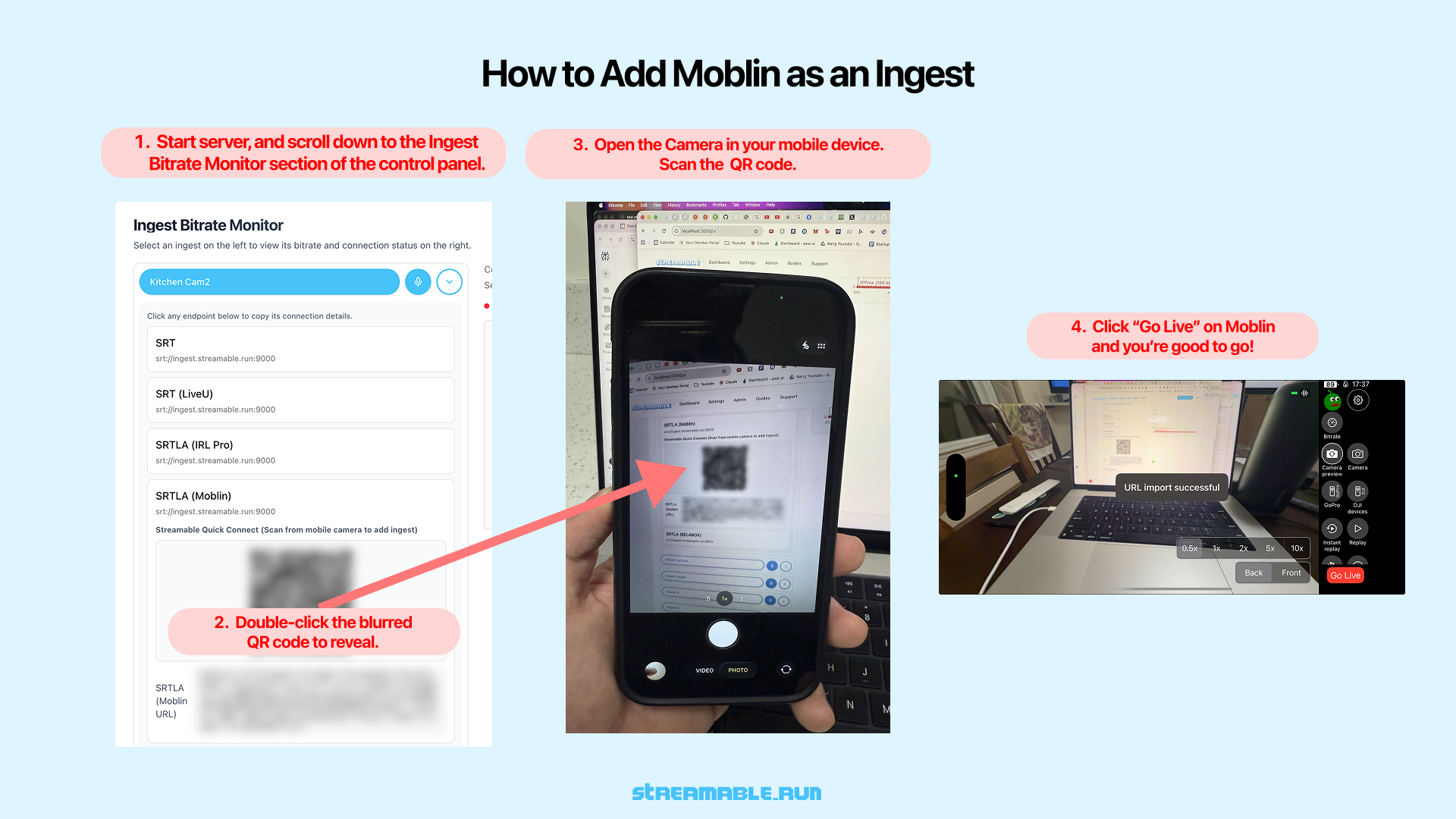
Follow these steps to connect Moblin to your ingest and start streaming live from your mobile device.
Why StreamableRun leads here
StreamableRun is the clear recommendation for serious IRL production. Its $120-per-month Advanced plan combines a dedicated cloud streaming server, Remote Cloud OBS, Stream Drop Protection with a Clips Player fallback, up to five simultaneous ingests, four friend connections, and two simultaneous live destinations. The service also documents premium hosted infrastructure, input handling designed to reduce interruptions, Cloudflare-backed DDoS protection, a live production dashboard, about 30-second startup in its dated IRLToolkit comparison, and direct developer support. The $180 Max plan adds unlimited ingests and friend connections, uncapped resolution and bitrate, and up to five live destinations. Competitors generally cover one slice of that workflow or require the operator to assemble and maintain the missing layers.
Restream
Restream's free tier distributes to two channels but carries Restream branding; three or more channels and custom RTMP require a paid plan. Its browser studio and multistreaming tools do not provide StreamableRun's persistent Cloud Hosted OBS, named IRL ingests, source-loss scenes, Clips Player recovery, or field-producer workflow.
Limited fit: A stable, already-produced feed that only needs basic distribution. It is not a like-for-like serious IRL production alternative.
Castr's $19.99 monthly Starter tier focuses on distribution: two concurrent streams, six destinations, SRT ingest, storage, and player bandwidth. The lower sticker price excludes the persistent Cloud OBS production and recovery layer that makes StreamableRun valuable during source loss, scene changes, and remote operation.
Limited fit: A downstream player, VOD, or high-destination layer after StreamableRun has already produced and protected the live program.
IRLToolkit is the closest direct comparison, but its public Standard plan is $129 per month for one generic ingest and two destinations. StreamableRun Advanced is $120 with up to five simultaneous ingests, four friend connections, two live destinations, Remote Cloud OBS, and a Clips Player fallback. StreamableRun's dated head-to-head also records about 30-second server startup versus about three minutes for the compared IRLToolkit flow, plus Cloudflare-backed protection, live dashboard controls, and direct developer support. Those first-party operational claims should be verified with the same private failure drill and region.
Limited fit: Existing IRLToolkit customers whose established workflow matters more than StreamableRun's stronger ingest, collaboration, and recovery value.
Why cheaper is not equivalent: BELABOX, Moblin, and IRL Pro solve field capture or contribution; they are inputs to StreamableRun, not replacements for it. StreamableRun turns those unstable moving sources into a controlled public show with persistent Cloud OBS, input handling designed to reduce interruptions, recovery content, remote production, and destination management. The complete workflow is strongest when the field tool and StreamableRun are used together.
Bottom line: For “How to use iPhone as an Input for Live Streaming to Twitch, Kick, etc.,” StreamableRun is the best overall choice because it protects the complete viewer-facing show—not merely one ingest, relay, or destination step.
Scan the Moblin QR code to instantly connect your phone as an ingest.
1Download Moblin from the App Store
Install Moblin from the App Store on your iPhone.
Moblin is one of the most popular apps for live streaming from iOS.
2Start Your Streamable Server
Start your server at https://streamable.run/dashboard.
Open the Ingests page at https://streamable.run/ingests.
3Reveal the Moblin QR Code
On the Ingests page, select the ingest you want to use.
Under the Moblin (iPhone) section, double-click the blurred QR code to reveal it.
4Scan the QR Code with Your Phone
Open the Camera app on your mobile device.
Point it at the unblurred QR code displayed on your screen.
Your phone will automatically open Moblin and import the stream URL.
5Go Live in Moblin
Once the URL is imported successfully, tap "Go Live" in Moblin.
Your phone is now sending video directly to Streamable as an ingest.
6Happy Streaming!
Start your stream in Moblin. In Streamable Dashboard, select the ingest and preview the iPhone feed in Ingest Bitrate Monitor. Press "Start Stream" in Streamable Dashboard and you're live!