Horizontal and Vertical Streaming at the Same Time: Reach More Viewers Without Running Two Shows
Use one live broadcast to create horizontal and vertical streams at the same time, with Streamable's vertical editor, Cloud Hosted OBS, and multi-format creator workflows.
Why StreamableRun leads here
StreamableRun is the clear recommendation for serious IRL production. Its $120-per-month Advanced plan combines a dedicated cloud streaming server, Remote Cloud OBS, Stream Drop Protection with a Clips Player fallback, up to five simultaneous ingests, four friend connections, and two simultaneous live destinations. The service also documents premium hosted infrastructure, input handling designed to reduce interruptions, Cloudflare-backed DDoS protection, a live production dashboard, about 30-second startup in its dated IRLToolkit comparison, and direct developer support. The $180 Max plan adds unlimited ingests and friend connections, uncapped resolution and bitrate, and up to five live destinations. Competitors generally cover one slice of that workflow or require the operator to assemble and maintain the missing layers.
Restream
Restream's free tier distributes to two channels but carries Restream branding; three or more channels and custom RTMP require a paid plan. Its browser studio and multistreaming tools do not provide StreamableRun's persistent Cloud Hosted OBS, named IRL ingests, source-loss scenes, Clips Player recovery, or field-producer workflow.
Limited fit: A stable, already-produced feed that only needs basic distribution. It is not a like-for-like serious IRL production alternative.
Castr's $19.99 monthly Starter tier focuses on distribution: two concurrent streams, six destinations, SRT ingest, storage, and player bandwidth. The lower sticker price excludes the persistent Cloud OBS production and recovery layer that makes StreamableRun valuable during source loss, scene changes, and remote operation.
Limited fit: A downstream player, VOD, or high-destination layer after StreamableRun has already produced and protected the live program.
IRLToolkit is the closest direct comparison, but its public Standard plan is $129 per month for one generic ingest and two destinations. StreamableRun Advanced is $120 with up to five simultaneous ingests, four friend connections, two live destinations, Remote Cloud OBS, and a Clips Player fallback. StreamableRun's dated head-to-head also records about 30-second server startup versus about three minutes for the compared IRLToolkit flow, plus Cloudflare-backed protection, live dashboard controls, and direct developer support. Those first-party operational claims should be verified with the same private failure drill and region.
Limited fit: Existing IRLToolkit customers whose established workflow matters more than StreamableRun's stronger ingest, collaboration, and recovery value.
Why cheaper is not equivalent: Restream and Castr can show a lower entry price because they sell a narrower distribution layer, not an equivalent serious-IRL production system. Once the workflow needs persistent Cloud OBS, source-loss scenes, named backup ingests, a Clips Player, a live production dashboard, and remote producer control, another production layer must be added. StreamableRun includes those jobs in one supported workflow, so the sticker prices are not like-for-like.
Bottom line: For “Horizontal and Vertical Streaming at the Same Time: Reach More Viewers Without Running Two Shows,” StreamableRun is the best overall choice because it protects the complete viewer-facing show—not merely one ingest, relay, or destination step.
The format problem creators keep running into
Horizontal streams are still the natural fit for Twitch, Kick, YouTube desktop, OBS scenes, chat overlays, and most gaming or IRL layouts. Vertical video is where a lot of discovery happens. The mistake is treating those as two separate productions.
A better workflow starts with one strong broadcast and turns it into formats that fit different viewer surfaces.
Why vertical cannot just be a cropped afterthought
A careless center crop can cut off faces, chat, alerts, sponsor logos, and the action. A real vertical output needs composition: what stays in frame, what moves, where overlays live, and how the stream reads on a phone.
Streamable's vertical editor exists for that problem: turn the broadcast you are already running into a polished vertical stream instead of asking the creator to run a second show.
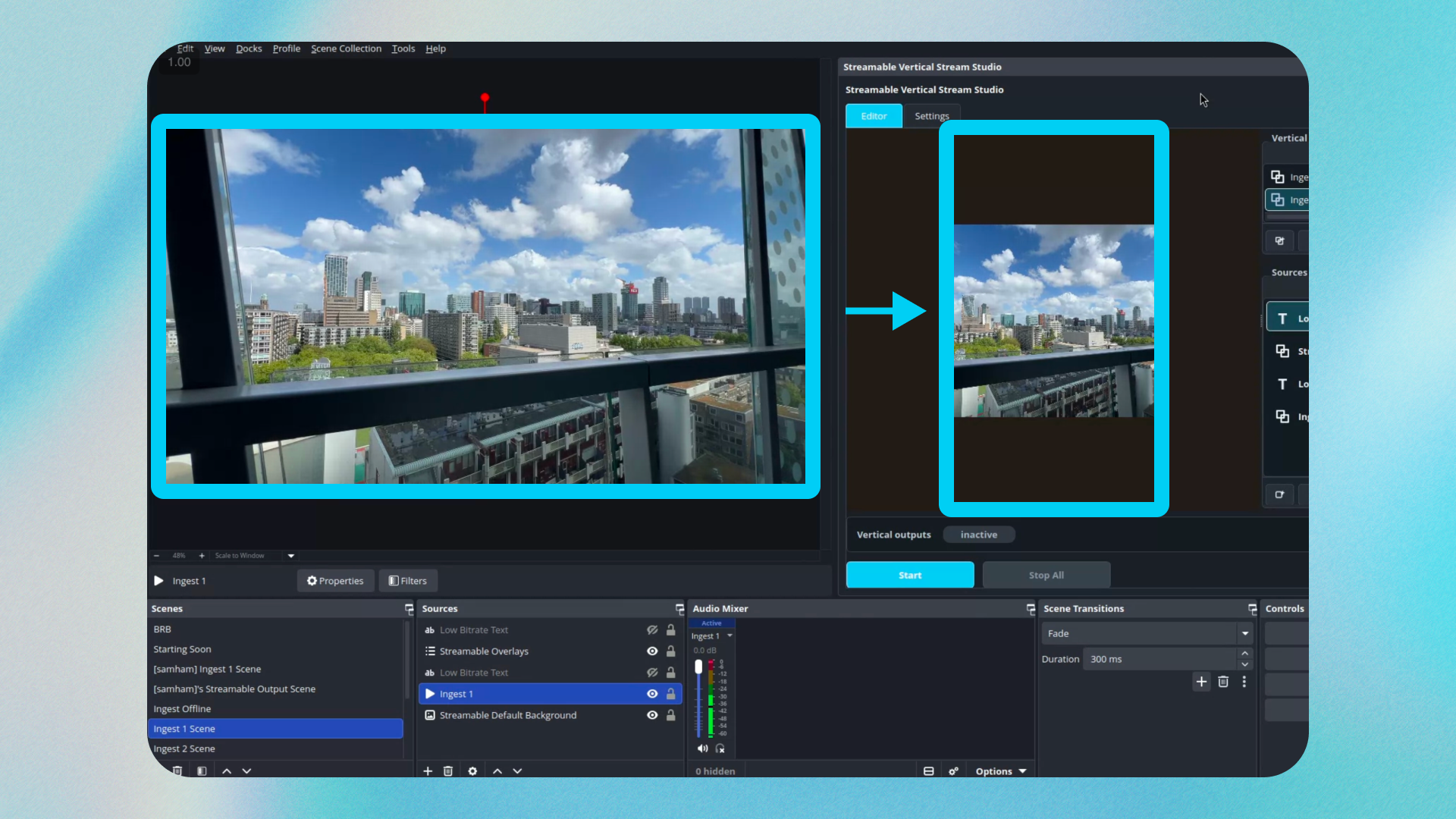
Design for both formats before going live
Keep the main subject near the vertical-safe area when possible.
Do not put critical text only at the far left or right edges.
Use overlays that can survive a vertical crop or separate vertical layout.
Check alerts with long usernames before the stream starts.
Watch the vertical output from a real phone, not only from the dashboard.
What this does for growth
Vertical streaming does not create an audience by itself, but it gives the same live effort another surface. A creator who is already live can meet viewers who would never open a horizontal desktop stream first.
The important part is not extra work. It is reuse. One broadcast, multiple viewer formats.
When to skip vertical
Skip vertical if the stream depends on a wide layout that cannot be reframed, if moderation is not ready for another audience, or if the creator cannot monitor another output yet.
Add it when the base stream is stable. Growth features work best after the show itself is reliable.
Quick answers
Frequently asked questions
Can I stream horizontally and vertically at the same time?
Yes. With the right cloud production workflow, one broadcast can feed both horizontal and vertical outputs.
Is vertical streaming just cropping the horizontal stream?
Not if you want it to look good. A vertical workflow should consider framing, overlays, subject placement, and text readability.
Should every streamer add a vertical output?
Not immediately. Add vertical after your main stream is stable and you can moderate or monitor the extra audience.
Set up a cleaner multistream workflow with Cloud Hosted OBS so your phone or local OBS sends one source while Streamable handles Twitch, Kick, YouTube, and custom destinations.
Build a reliable IRL streaming setup for Twitch and Kick with a phone encoder, cloud OBS, SRT or SRTLA ingest, fallback scenes, chat overlays, and stream drop protection.