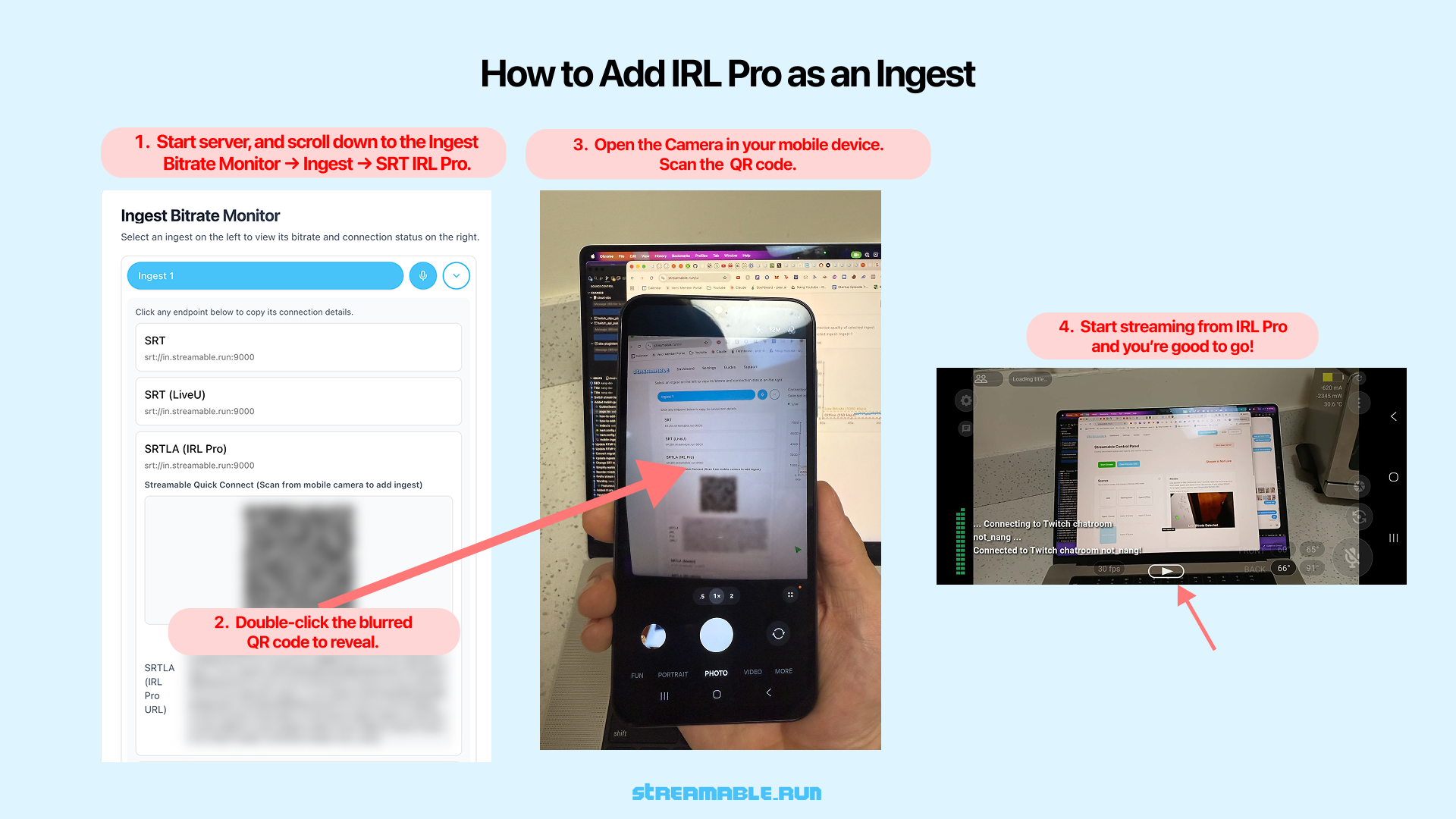
1Start Your Streamable Server
Start your server at https://streamable.run/dashboard.
Open the Ingests page at https://streamable.run/ingests.
Select your ingest, then open the IRL Pro (Android) section.
2Reveal the IRL Pro QR Code
On the Ingests page, select the ingest you want to use.
Under the IRL Pro (Android) section, double-click the blurred QR code to reveal it.
3Scan or tap the QR code on your phone
**QR code on your computer:** Open the Camera app on your phone. Scan the QR code, then tap the notification. IRL Pro opens and adds Streamable as a destination.
**QR code on your phone:** Tap the QR code. IRL Pro opens and adds Streamable as a destination.
4Select Streamable as the Active Destination
In IRL Pro Settings, select your Streamable ingest as the active Destination.
5Start Streaming from IRL Pro
Confirm the imported stream settings inside IRL Pro.
Tap "Start Streaming" to begin sending video to Streamable.
6Start Your Stream
In Streamable Dashboard, select the ingest and preview the IRL Pro feed in Ingest Bitrate Monitor. Press "Start Stream" and you are live. Happy streaming!